
• Skip to primary navigation
  • Skip to main content
  • Skip to primary sidebar
Virtualization.com

Virtualization.com

News and insights from the vibrant world of virtualization and cloud computing

  • News
  • Featured
  • Partnerships
  • People
  • Acquisitions
  • Guest Posts
  • Interviews
  • Videos
  • Funding

virtualization

3PAR Introduces New Incentive Program V-TIP

July 28, 2008 by Robin Wauters Leave a Comment

3PAR announced today its Virtual Technology Incentive Program (V-TIP) which is designed to combine the benefits of 3PAR Utility Storage with financial incentives offered by Pacific Gas and Electric Company (PG&E) for datacenter storage virtualization and thin provisioning projects.

The financial incentives offered to 3PAR customers by PG&E reward 3PAR customers for deploying “energy-smart storage”. PG&E rebates are based on the amount of energy savings achieved by datacenters through storage virtualization and the use of 3PAR Thin Provisioning and other thin technologies from 3PAR. To qualify for these financial incentives, Northern and Central California PG&E customers must apply for and be accepted into the rebate program prior to deploying a new 3PAR-based storage implementation.

Financial incentives from PG&E are just a part of the energy and environmental benefits from 3PAR Utility Storage. According to a Wikibon Energy Lab case study, customers replacing older storage technologies with next-generation 3PAR InServ arrays have saved as much as 90%* on annual energy costs related to powering and cooling their storage systems.

[Source: MarketWatch]
Filed Under: News, Partnerships, Videos Tagged With: 3PAR, 3PAR Utility Storage, 3PAR V-TIP, incentive program, Pacific Gas and Electric, Pacific Gas and Electric Company, PG&E, Utility Storage, V-TIP, virtualisation, virtualization

VMware Planning Massive New Data Center In Washington

July 28, 2008 by Robin Wauters Leave a Comment

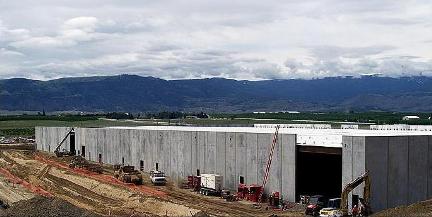
According to Data Center Knowledge, VMware is planning to locate a new data center in East Wenatchee (North Central Washington), leasing no less than 100,000 square feet of space in a new facility being built by Sabey Corporation on its Intergate.Columbia campus. VMware will be the biggest leaser by far; their data center will take up about two-thirds of the 189,000 square foot second building.

Company spokeswoman Melinda Marks said that VMware will use its new data center to expand research and development.

Filed Under: News Tagged With: data center, Melinda Marks, Sabey, Sabey Corp, Sabey Corporation, virtualisation, virtualization, vmware, Washington, Wenatchee

Quest Software Releases Provision Networks Virtual Access Suite 5.10

July 28, 2008 by Robin Wauters Leave a Comment

Patrick Rouse, Sales Engineer at Quest Software, wrote up a blog post to announce that their Provision Networks division has shipped the new version of the company’s cross-platform VDI connection broker, Virtual Access Suite (VAS) 5.10. The 5.9 version was released to the public in December of 2007, and had one service pack, so all the following features are new to version 5.10:

Web Portal – Web-IT:

  • Web-IT migrated to ASP.Net 1.1 to ASP.Net 2.0
  • Web-IT config files migrated from text to XML files to support future automation
  • Web-IT Integration With Juniper Secure Access
  • Smart Card login support

Clients:

  • Ticketing – Secure tickets will be issued per connection request, obviating the need to embed hashed user credentials inside .pit connection files
  • Enhanced Multi-monitor support
  • Updated Linux and Java Clients
  • PXE Boot Linux Client
  • LiveCD Linux Client
  • All AppPortal Client settings can be stored in a single configuration file
  • Java Client fully supported via Secure Gateway

Connection Broker & Management Console:

  • Support for Microsoft Hyper-V
  • Support for Virtual Iron 4.3.x
  • Dynamic Computer Group Auto-expansion – Auto Provisioning of new computers
  • Server Provisioning
  • Delete computers that have not been used in a specified number of days
  • Realtime enumeration of running processes on Managed Computers
  • Termination of running processes on Managed Computers.
  • Power Management of ACPI and WoL (Wake on LAN) capable computers and servers
  • MSI Package Deployment to Computer Groups or Managed Computers and servers
  • Disable/Enable Computer Groups or Managed Computers during maintenance cycles
  • Unique Computer names enforced across Desktop Groups and Data Centers
  • Display Realtime License Usage
  • Retrieval and display of VM Template Sizes
  • Wizard Driven Managed Desktop creation
  • Streamlined Softgrid Integration
  • Option to bypass proxy settings for Console to Broker communication
  • Verification of sufficient disk space on target storage when provisioning servers or desktops.

Task Automation for Power Management (multiple recurrence options or single instance):

  • Power Off
  • Power On
  • Reset
  • Resume – for VMware and Hyper-V
  • Standby – for ACPI & WoL Devices
  • Suspend -for VMware and Hyper-V
  • Wakeup – for ACPI & WoL Devices

Task Automation for Operating System operations (multiple recurrence options or single instance):

  • Log off user
  • Reset Session
  • Restart O/S
  • Shutdown O/S

Task Automation for Virtual machines (multiple recurrence options or single instance):

  • Delete VM
  • Delete VM not accessed in a specified number of days

Task Automation for Miscellaneous Tasks (multiple recurrence options or single instance):

  • Copy file to computer
  • Enable/Disable Computer
  • Initialize Computer
  • Run Program/Script on Computer

Task Automation for MSI Packages (multiple recurrence options or single instance):

  • Install MSI Package
  • Update MSI Package
  • Uninstall MSI Package

Setup Program:

  • Wizard-based setup program to automate database creation, upgrade, and management of VMware trust store and Virtual Iron jar libraries
  • Terminal Servers and Connection Brokers are automatically added to the Provision Farm in the Provision Management Console.

Experience Optimization Pack:

  • Bi-directional Audio – Microphone Redirection
  • Local Text Echo – Latency Masking for typing over latent networks
  • Multi-media Redirection – seamlessly redirects multi-media content to the client CODEC for local playback. – This will be released as a separate 5.10 update, as it has not been released from QA yet.

Filed Under: News Tagged With: Patrick Rouse, Provision Networks, Provision Networks VAS, Provision Networks VAS 5.10, Provision Networks Virtual Access Suite, Provision Networks Virtual Access Suite 5.10, quest, quest software, VAS, VAS 5.10, VAS 5.9, VDI, VDI connection broker, Virtual Access Suite, Virtual Access Suite 5.10, Virtual Access Suite 5.9, virtualisation, virtualization

VMware Releases Infrastructure 3.5 Update 2, ESX and VirtualCenter Get Upgrades, ESXi Now 100% Free

July 28, 2008 by Robin Wauters 1 Comment

VMware has released Update 2 for Infrastructure 3.5, listing a whole set of updates and features. At the same time, the company has made the license for ESXi completely free, as announced last week during the earnings call.

These are the highlights of some of the enhancements available in this release of VMware Infrastructure 3 (free evaluation here):

  • Windows Server 2008 support – Windows Server 2008 (Standard, Enterprise, and Datacenter editions) is supported as a guest operating system. With VMware’s memory overcommit technology and the reliability of ESX, virtual machine density can be maximized with this new guest operating system to achieve the highest degree of ROI. Guest operating system customizations and Microsoft Cluster Server (MSCS) are not supported with Windows Server 2008.
  • Enhanced VMotion Compatibility – Enhanced VMotion compatibility (EVC) simplifies VMotion compatibility issues across CPU generations by automatically configuring server CPUs with Intel FlexMigration or AMD-V Extended Migration technologies to be compatible with older servers. Once EVC is enabled for a cluster in the VirtualCenter inventory, all hosts in that cluster are configured to ensure CPU compatibility for VMotion. VirtualCenter will not permit the addition of hosts which cannot be automatically configured to be compatible with those already in the EVC cluster.
  • Storage VMotion – Storage VMotion from a FC/iSCSI datastore to another FC/iSCSI datastore is supported. This support is extended on ESX/ESXi 3.5 Update 1 as well.
  • VSS quiescing support – When creating quiesced snapshot of Windows Server 2003 guests, both filesystem and application quiescing are supported. With Windows Server 2008 guests, only filesystem quiescing is supported. For more information, see the Virtual Machine Backup Guide and the VMware Consolidated Backup 1.5 Release Notes.
  • Hot Virtual Extend Support – The ability to extend a virtual disk while virtual machines are running is provided. Hot extend is supported for vmfs flat virtual disks without snapshots opened in persistent mode.
  • 192 vCPUs per host – VMware now supports increasing the maximum number of vCPUs per host 192 given that the maximum number of Virtual Machines per host is 170 and that no more than 3 virtual floppy devices or virtual CDROM devices are configured on the host at any given time. This support is extended on ESX 3.5 Update 1 as well.

As for the hardware enablement and management:

  • 8Gb Fiber Channel HBAs – Support is available for 8Gb fiber channel HBAs. See the I/O Compatibility Guide for ESX Server 3.5 and ESX Server 3i for details.
  • SAS arrays – more configurations are supported. See the Storage/SAN Compatibility Guide for ESX Server 3.5 and ESX Server 3i for details.
  • 10 GbE iSCSI initiator – iSCSI over a 10GbE interface is supported. This support is extended on ESX Server 3.5 Update 1, ESX Server version 3.5 Update 1 Embedded and ESX Server version 3.5 Update 1 Installable as well.
  • 10 GbE NFS support – NFS over a 10GbE interface is supported.
  • IBM System x3950 M2 – x3950 M2 in a 4-chassis configuration is supported, complete with hardware management capabilities through multi-node Intelligent Platform Management Interface (IPMI) driver and provider. Systems with up to 32 cores are fully supported. Systems with more than 32 cores are supported experimentally.
  • PMI OEM extension support – Execution of IPMI OEM extension commands is supported.
  • System health monitoring through CIM providers – More Common Information Model (CIM) providers are added for enhanced hardware monitoring, including storage management providers provided by QLogic and Emulex. LSI MegaRAID providers are also included and are supported experimentally.
  • CIM SMASH/Server Management API – The VMware CIM SMASH/Server Management API provides an interface for developers building CIM-compliant applications to monitor and manage the health of systems. CIM SMASH is now a fully supported interface on ESX Server 3.5 and VMware ESX Server 3i.
  • Display of system health information – More system health information is displayed in VI Client for both ESX Server 3.5 and VMware ESX Server 3i.
  • Remote CLI – Remote Command Line Interface (CLI) is now supported on ESX Server 3.5 as well as ESX Server 3i. See the Remote Command-Line Interface Installation and Reference Guide for more information.

VirtualCenter 2.5 update 2 adds full support for monitoring individual virtual machine failures based on VMware tools heartbeats. This release also extends support for clusters containing mixed combinations of ESX and ESXi hosts, and minimizes previous configuration dependencies on DNS. It also extends support for alarms on the overall health of the server by considering the health of each of the individual system components such as memory and power supplies. Alarms can now be configured to trigger when host health degrades.

VirtualCenter 2.5 Update 2 provides the ability of creating a clone of a powered-on virtual machine without any downtime to the running virtual machine. Therefore, administrators are no longer required to power off a virtual machine in order to create a clone of it. Also, you can now automatically authenticate to VirtualCenter using your current Windows domain login credentials on the local workstation, as long as the credentials are valid on the VirtualCenter server.

This capability also supports logging in to Windows using Certificates and Smartcards. It can be used with the VI Client or the VI Remote CLI to ensure that scripts written using the VI Toolkits can take advantage of the Windows credentials of your current session to automatically connect to VirtualCenter.

VMware

Filed Under: Featured, News Tagged With: ESX, ESXi, VI, VI 3, virtualcenter, VirtualCenter 2.5, virtualisation, virtualization, vmware, VMware ESX, VMware ESXi, VMware Infrastructure, VMware Infrastructure 3, VMWare Infrastructure 3.5, VMWare Infrastructure 3.5 Update 2, VMware VI, VMware VI 3.5, VMware VI 3.5 Update 2, vmware virtualcenter, VMware VirtualCenter 2.5

Symantec Sets Up Virtualization Lab in Japan

July 28, 2008 by Robin Wauters Leave a Comment

Symantec today announced that Symantec Japan has opened its new “Virtualisation Solutions Lab” for customers and partners, as the company continues to deliver on its virtualization strategy.

The Virtualisation Solutions Lab will enable Symantec Japan to test and optimize Symantec’s products for specific virtual environments quickly, and provide customers and partners with the opportunity to gain hands-on experience and see demonstrations of solution deployments for their environments. With this new facility, Symantec Japan claims it can better support its customers and partners who decide to implement virtualization solutions, as market needs for virtualization continue to grow rapidly.

The Virtualisation Solutions Lab is located within the Japan Engineering Center at Symantec Japan’s headquarters (Minato-ku, Tokyo), which is responsible for all technological verification required for Symantec’s products before their release into the Japanese market. With the launch of this new facility, the Virtualisation Solutions Lab will introduce comprehensive virtualisation solutions for data centres in VMware environments.

The line-up of solutions to be provided by the Virtualisation Solutions Lab is as follows:

  • Comprehensive backup solutions using Veritas NetBackup for VMware environments
  • Failover solutions with high availability of guest OS and VMware applications using Veritas Cluster Server
  • Backup and restore solutions for P2V (physical to virtual) system images using Symantec Backup Exec System Recovery
  • Deployment solutions for virtual servers using the Symantec Altiris platform

Symantec Japan plans to work closely with Citrix Systems and Microsoft to test virtualization solutions for Citrix XenServer and Windows Server 2008 Hyper-V environments at the Virtualisation Solutions Lab in addition to VMware Infrastructure 3. In addition, Symantec Japan plans to organize regular product familiarization seminars as it continues to expand its range of solutions for its customers and partners.

[Source: ITWeb]

Symantec

Filed Under: News Tagged With: backup, citrix, Citrix Systems, citrix xenserver, microsoft, Microsoft Hyper-V, research, storage, Symantec, Symantec Japan, test, testing, Veritas, Veritas NetBackup, virtualisation, Virtualisation Solutions Lab, virtualization, Virtualization Solutions Lab, vmware, VMware Infrastructure 3

AppSense Revenues Growing Rapidly

July 25, 2008 by Robin Wauters 1 Comment

AppSense, provider of user environment management solutions for large-scale environments, reported a 50 % increase in U.S. revenue for the fiscal year ended June 30, 2008.  Its global business realized a 30 percent increase in worldwide revenue.

AppSense is aggressively focusing on the U.S. market, having doubled its investment in the U.S. over the last two quarters with increased investment planned again for the current fiscal year.  New U.S. customers this fiscal year include JP Morgan Chase, Lowes, United Airlines, Wachovia, Wal-Mart, ESPN, Applied Materials, and CB Richard Ellis, among others.  AppSense counts 15 of the top 20 banks worldwide as customers, with nine of them actively using AppSense software to personalize their virtual desktop infrastructure (VDI) environments.

AppSense’s user environment management solution enables users to have the same look and feel, shortcuts and other settings on a virtual desktop that they had on their PC, while ensuring they adhere to company policies, such as accessing pre-determined printers, applications, networks, drivers and folders.  This allows companies to gain the benefits of desktop standardization and automation, including savings in hardware, storage and management oversight, with no impact on a user’s experience.

AppSense’s solution lets IT use a combination of desktop and application delivery methods—such as VDI, presentation virtualization, streamed applications and local and provisioned desktops—and easily and transparently migrate users from a physical to a virtual desktop.

Filed Under: News Tagged With: AppSense, desktop virtualization, user environment management, VDI, Virtual Desktop Infrastructure, virtualisation, virtualization

  • « Go to Previous Page
  • Go to page 1
  • Interim pages omitted …
  • Go to page 117
  • Go to page 118
  • Go to page 119
  • Go to page 120
  • Go to page 121
  • Interim pages omitted …
  • Go to page 206
  • Go to Next Page »

Primary Sidebar

Tags

acquisition application virtualization Cisco citrix Citrix Systems citrix xenserver cloud computing Dell desktop virtualization EMC financing Funding Hewlett Packard HP Hyper-V IBM industry moves intel interview kvm linux microsoft Microsoft Hyper-V Novell oracle Parallels red hat research server virtualization sun sun microsystems VDI video virtual desktop Virtual Iron virtualisation virtualization vmware VMware ESX VMWorld VMWorld 2008 VMWorld Europe 2008 Xen xenserver xensource

Recent Comments

  • C program on Red Hat Launches Virtual Storage Appliance For Amazon Web Services
  • Hamzaoui on $500 Million For XenSource, Where Did All The Money Go?
  • vijay kumar on NComputing Debuts X350
  • Samar on VMware / SpringSource Acquires GemStone Systems
  • Meo on Cisco, Citrix Join Forces To Deliver Rich Media-Enabled Virtual Desktops

Copyright © 2025 · Genesis Sample on Genesis Framework · WordPress · Log in

  • Newsletter
  • Advertise
  • Contact
  • About