• Skip to primary navigation
  • Skip to main content
  • Skip to primary sidebar
Virtualization.com

Virtualization.com

News and insights from the vibrant world of virtualization and cloud computing

  • News
  • Featured
  • Partnerships
  • People
  • Acquisitions
  • Guest Posts
  • Interviews
  • Videos
  • Funding

VMware Infrastructure

Veeam Releases Monitor 3.0 Beta

August 5, 2008 by Robin Wauters Leave a Comment

After releasing Backup 2.0 last week, Veeam has now announced that Veeam Monitor version 3.0 is now available in beta.  Its new features, detailed below, increase the product’s trend analysis and troubleshooting capabilities – equipping IT admins to proactively manage the performance and availability of their VMware infrastructure.

New features in Veeam Monitor 3.0 include:

  • Enterprise scalability and support for multiple VirtualCenters. Is your environment getting too large to be handled by a single VirtualCenter? Veeam Monitor can help. New performance optimization and a special monitoring mode allow for enterprise scalability and provide the ability to gather monitoring information from large VI deployments with multiple VirtualCenters – all from a single console.
  • Multiple new alarm sources. The following new alarm sources are available in Veeam Monitor version 3.0 for even more comprehensive monitoring and alerting:
  • Alarm modeling. No more being flooded with alerts, and no more waiting for weeks to find out that your alarm settings don’t work as intended. With Veeam Monitor 3.0, you can model and test your alarms instantly. Simply use the new Alarm Modeling feature to test your alarm settings against your event history from VirtualCenter for an immediate evaluation. The new Alarm Modeling feature allows you to easily establish better benchmarks and thresholds. Based on the modeling results, you can fine-tune the alarms in case it appears that you will receive too many false positive alarms, or missing something important.
  • Capacity planning and trend analysis. Veeam Monitor’s new Trend Reporting feature allows you to discover trends and do proactive capacity planning. Project how your virtual environment will grow over time; find out how resource usage is changing for a specified host, resource pool or datacenter; and plan upgrades or migrations based on what you learn.
  • Correlation of VI events and performance data. Ever wondered about an unexpected resource consumption spike? Solve resource usage mysteries with new real-time monitoring graphs displaying known virtual infrastructure events, such as snapshot creation and deletion, or backup activities, directly on the performance graph.
  • Suppression of unwanted alarms. Tired of being slammed with alarms during backup activities? You can now instruct Veeam Monitor to suppress alerts raised during known VI activities, such as backup or snapshot operations.
  • Drill-down into VM. Want to research possible rogue VM activity? Veeam Monitor 3.0 provides you with the ability to drill down to an individual VM and find out what processes are running there, and how much CPU and memory they are consuming.
  • Connect to a VM directly from Veeam Monitor. Need to troubleshoot a VM that is not behaving as expected according to performance metrics? For your convenience, the Monitor 3.0 user interface features a new “Console” tab, which lets you connect to the VM console right from the Monitor interface.
  • Leverage VC history. No more waiting for monitoring data to be gathered before you can start working on it. When you connect to VirtualCenter for the first time, Veeam Monitor 3.0 fetches all historical performance and event data from it, giving you the ability to browse and analyze historical data immediately.

You can download the Beta of Veeam Monitor 3.0 here.

Veeam

Filed Under: News Tagged With: monitoring, Veeam, Veeam Monitor, Veeam Monitor 3.0, Veeam Monitor 3.0 beta, virtualisation, virtualization, vmware, VMware Infrastructure

DataSynapse Extends Dynamic Service Management Tools for VMware Infrastructure Support

July 30, 2008 by Robin Wauters Leave a Comment

DataSynapse, maker of dynamic application service management software, today announced that it is working with VMWare to provide customers with simplified deployment and operational management of application platforms and services to facilitate always-on, always-responsive virtualized applications.

As a member of the VMware Technology Alliance Partner (TAP) program, DataSynapse plans to integrate its FabricServer dynamic application service management software specifically with VMware VirtualCenter. This integration will allow IT organizations to automate deployment and provisioning and optimize service levels of server applications in a virtualized infrastructure, helping them to reduce capital and operating costs while delivering order of magnitude improvement in time to market for critical business applications.
DataSynapse FabricServer software is an enabling platform for standardizing and automating the configuration, activation, scaling and aligning application service levels with planned business policies, which minimizes downtime, automates service level management and improves enterprise application performance. Combined with VMware VMotion technology, VMware’s live migration capability, FabricServer provides responsive horizontal scalability.
DataSynapse

Filed Under: News, Partnerships Tagged With: DataSynapse, DataSynapse FabricServer, Dynamic Service Management, FabricServer, virtualcenter, virtualisation, virtualization, VMotion, vmware, VMware Infrastructure, VMware Technology Alliance Partner, vmware virtualcenter, VMware VMotion

Veeam Releases Backup 2.0 for VMware Infrastructure

July 30, 2008 by Robin Wauters 1 Comment

—

Veeam Software today announced general availability of Veeam Backup 2.0, a product offering both backup and replication for virtual environments. Version 2.0 includes added functionality, as well as a new optimized backup engine that allows for up to five times faster backup and replication performance than the 1.0 version.

Major new features in Veeam Backup 2.0 include:

  • Five times faster — Veeam Backup 2.0 has a new optimized backup
    engine, which allows for up to five times faster backup and replication
    performance than the previous version.
  • Windows Volume Shadow Copy Service (VSS) support — Veeam Backup 2.0
    leverages VSS to ensure consistent backup and recovery of VSS-aware
    applications, including Active Directory, Microsoft Exchange and Microsoft
    SQL Server.
  • ESXi support — Now customers can back up ESXi servers using VMware
    Consolidated Backup (VCB). File-level recovery is fully supported for
    guests running on ESXi, and full image restore is supported to ESX 3.x
    servers. These images can then be VMotioned to ESXi as needed.
  • Enhanced reporting and notification — Comprehensive real-time job
    statistics are available, including automated e-mail notification of backup
    job status, activity and performance details.
  • Backup portability — Veeam Backup users can now easily import backups
    made using previous versions of the software, or backups that have been
    archived to tape.
  • Support for third-party tape backup systems — Now users can specify a
    script to automatically run when the VMware backup is finished, initiating
    tape backups to begin.

Veeam Backup 2.0 is available immediately, and pricing still begins at $499 USD per socket.

Veeam

[Source: MarketWire]

Filed Under: News Tagged With: backup, Backup 2.0, replication, restore, Veeam, Veeam Backup 2.0, Veeam Backup Version 2.0, Veeam Software, virtualisation, virtualization, vmware, VMware Infrastructure

VMware Releases Infrastructure 3.5 Update 2, ESX and VirtualCenter Get Upgrades, ESXi Now 100% Free

July 28, 2008 by Robin Wauters 1 Comment

VMware has released Update 2 for Infrastructure 3.5, listing a whole set of updates and features. At the same time, the company has made the license for ESXi completely free, as announced last week during the earnings call.

These are the highlights of some of the enhancements available in this release of VMware Infrastructure 3 (free evaluation here):

  • Windows Server 2008 support – Windows Server 2008 (Standard, Enterprise, and Datacenter editions) is supported as a guest operating system. With VMware’s memory overcommit technology and the reliability of ESX, virtual machine density can be maximized with this new guest operating system to achieve the highest degree of ROI. Guest operating system customizations and Microsoft Cluster Server (MSCS) are not supported with Windows Server 2008.
  • Enhanced VMotion Compatibility – Enhanced VMotion compatibility (EVC) simplifies VMotion compatibility issues across CPU generations by automatically configuring server CPUs with Intel FlexMigration or AMD-V Extended Migration technologies to be compatible with older servers. Once EVC is enabled for a cluster in the VirtualCenter inventory, all hosts in that cluster are configured to ensure CPU compatibility for VMotion. VirtualCenter will not permit the addition of hosts which cannot be automatically configured to be compatible with those already in the EVC cluster.
  • Storage VMotion – Storage VMotion from a FC/iSCSI datastore to another FC/iSCSI datastore is supported. This support is extended on ESX/ESXi 3.5 Update 1 as well.
  • VSS quiescing support – When creating quiesced snapshot of Windows Server 2003 guests, both filesystem and application quiescing are supported. With Windows Server 2008 guests, only filesystem quiescing is supported. For more information, see the Virtual Machine Backup Guide and the VMware Consolidated Backup 1.5 Release Notes.
  • Hot Virtual Extend Support – The ability to extend a virtual disk while virtual machines are running is provided. Hot extend is supported for vmfs flat virtual disks without snapshots opened in persistent mode.
  • 192 vCPUs per host – VMware now supports increasing the maximum number of vCPUs per host 192 given that the maximum number of Virtual Machines per host is 170 and that no more than 3 virtual floppy devices or virtual CDROM devices are configured on the host at any given time. This support is extended on ESX 3.5 Update 1 as well.

As for the hardware enablement and management:

  • 8Gb Fiber Channel HBAs – Support is available for 8Gb fiber channel HBAs. See the I/O Compatibility Guide for ESX Server 3.5 and ESX Server 3i for details.
  • SAS arrays – more configurations are supported. See the Storage/SAN Compatibility Guide for ESX Server 3.5 and ESX Server 3i for details.
  • 10 GbE iSCSI initiator – iSCSI over a 10GbE interface is supported. This support is extended on ESX Server 3.5 Update 1, ESX Server version 3.5 Update 1 Embedded and ESX Server version 3.5 Update 1 Installable as well.
  • 10 GbE NFS support – NFS over a 10GbE interface is supported.
  • IBM System x3950 M2 – x3950 M2 in a 4-chassis configuration is supported, complete with hardware management capabilities through multi-node Intelligent Platform Management Interface (IPMI) driver and provider. Systems with up to 32 cores are fully supported. Systems with more than 32 cores are supported experimentally.
  • PMI OEM extension support – Execution of IPMI OEM extension commands is supported.
  • System health monitoring through CIM providers – More Common Information Model (CIM) providers are added for enhanced hardware monitoring, including storage management providers provided by QLogic and Emulex. LSI MegaRAID providers are also included and are supported experimentally.
  • CIM SMASH/Server Management API – The VMware CIM SMASH/Server Management API provides an interface for developers building CIM-compliant applications to monitor and manage the health of systems. CIM SMASH is now a fully supported interface on ESX Server 3.5 and VMware ESX Server 3i.
  • Display of system health information – More system health information is displayed in VI Client for both ESX Server 3.5 and VMware ESX Server 3i.
  • Remote CLI – Remote Command Line Interface (CLI) is now supported on ESX Server 3.5 as well as ESX Server 3i. See the Remote Command-Line Interface Installation and Reference Guide for more information.

VirtualCenter 2.5 update 2 adds full support for monitoring individual virtual machine failures based on VMware tools heartbeats. This release also extends support for clusters containing mixed combinations of ESX and ESXi hosts, and minimizes previous configuration dependencies on DNS. It also extends support for alarms on the overall health of the server by considering the health of each of the individual system components such as memory and power supplies. Alarms can now be configured to trigger when host health degrades.

VirtualCenter 2.5 Update 2 provides the ability of creating a clone of a powered-on virtual machine without any downtime to the running virtual machine. Therefore, administrators are no longer required to power off a virtual machine in order to create a clone of it. Also, you can now automatically authenticate to VirtualCenter using your current Windows domain login credentials on the local workstation, as long as the credentials are valid on the VirtualCenter server.

This capability also supports logging in to Windows using Certificates and Smartcards. It can be used with the VI Client or the VI Remote CLI to ensure that scripts written using the VI Toolkits can take advantage of the Windows credentials of your current session to automatically connect to VirtualCenter.

VMware

Filed Under: Featured, News Tagged With: ESX, ESXi, VI, VI 3, virtualcenter, VirtualCenter 2.5, virtualisation, virtualization, vmware, VMware ESX, VMware ESXi, VMware Infrastructure, VMware Infrastructure 3, VMWare Infrastructure 3.5, VMWare Infrastructure 3.5 Update 2, VMware VI, VMware VI 3.5, VMware VI 3.5 Update 2, vmware virtualcenter, VMware VirtualCenter 2.5

VMware Eyes Chinese Market, Signs OEM Agreement With Inspur

June 25, 2008 by Robin Wauters Leave a Comment

VMware and Inspur today announced an OEM agreement to further accelerate the adoption of VMware virtualization in China. Starting today, Inspur is selling, distributing and fully supporting VMware’s datacenter virtualization and management suite, VMware Infrastructure, on Inspur server systems.

Inspur

The two companies will collaborate on market development, product sales, professional training and customer acquisition as well as technical services.

“China’s rapid economic growth and increased focus on conserving energy have spurred the need for customers to adopt the best solutions for meeting business demands while enabling a green datacenter,” said Diane Greene, president and chief executive officer of VMware. “VMware virtualization addresses this need with solutions that not only consolidate servers, but also jump ahead to the next stages of virtualization: aggregating IT resources in virtualized pools and automating the management of these resources. VMware virtualization combined with Inspur’s expertise in local customer requirements offers a way to quickly cut operating and capital costs by as much as half, deliver applications faster and more reliably in virtual machines, improve information security, and run a more flexible and eco-friendly IT environment.”

Customers can now purchase Inspur servers bundled with VMware Infrastructure 3, provided with full support from Inspur.

[Source: Welt Online]

Filed Under: Partnerships Tagged With: China, datacenter virtualization, Diane Greene, Inspur, OEM, OEM agreement, virtualisation, virtualization, virtualization management, vmware, VMware Infrastructure, VMware Infrastructure 3, VMware Inspur

Andrew Kutz Upgrades VMware Infrastructure Plug-in SVmotion

June 16, 2008 by Robin Wauters 3 Comments

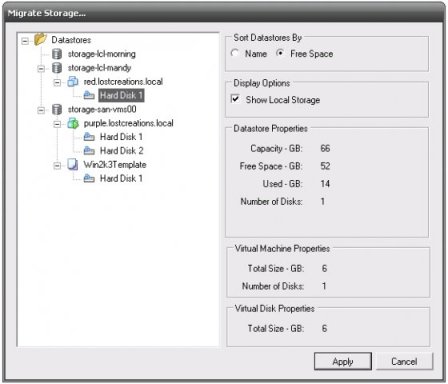
Andrew Kutz, author, developer and one of the leading experts on x86 server virtualization, has released version 1.0 of his populair VI plug-in SVmotion. The plug-in is available at SourceForge and includes new features like:

  • No longer counts RDM files against datastore size, fixing the bug that plagued the last version.
  • SVMotion operations against templates are not supported since VMware does not support them.
  • Added tool tips that explain why a relocation cannot take place
  • Automatically registers itself upon installation so you don’t have to enable it inside the VI client.
  • All SVMotion events write out a log, enabling better understanding of what went wrong in case of an error.
  • Aside from the library that loads the plug-in, all of VMware’s internal code has been replaced with the VI Toolkit for .NET.
  • The project is now supported by almost 20 unit tests, helping to ensure fewer bugs and greater stability.
  • The unit tests can be expanded to include testing for a system-resource supported number of servers since they use mock testing designed to work with the VI Toolkit for .NET.
  • The project is now built using NAnt, which allows nightly builds of the source, creates distributions, and builds the MSI installer.

SVmotion

Update: also read this Virtualization Admin article, and Andrew’s comment on this post.

[Source: VMBlog]

Filed Under: News Tagged With: Andrew Kutz, plug-in, SVmotion, SVmotion 1.0, VI, VI plug-in, virtualisation, virtualization, vmware, VMware Infrastructure, VMware SVmotion, VMware SVmotion 1.0

  • « Go to Previous Page
  • Go to page 1
  • Go to page 2
  • Go to page 3
  • Go to Next Page »

Primary Sidebar

Tags

acquisition application virtualization Cisco citrix Citrix Systems citrix xenserver cloud computing Dell desktop virtualization EMC financing Funding Hewlett Packard HP Hyper-V IBM industry moves intel interview kvm linux microsoft Microsoft Hyper-V Novell oracle Parallels red hat research server virtualization sun sun microsystems VDI video virtual desktop Virtual Iron virtualisation virtualization vmware VMware ESX VMWorld VMWorld 2008 VMWorld Europe 2008 Xen xenserver xensource

Recent Comments

  • C program on Red Hat Launches Virtual Storage Appliance For Amazon Web Services
  • Hamzaoui on $500 Million For XenSource, Where Did All The Money Go?
  • vijay kumar on NComputing Debuts X350
  • Samar on VMware / SpringSource Acquires GemStone Systems
  • Meo on Cisco, Citrix Join Forces To Deliver Rich Media-Enabled Virtual Desktops

Copyright © 2025 · Genesis Sample on Genesis Framework · WordPress · Log in

  • Newsletter
  • Advertise
  • Contact
  • About