• Skip to primary navigation
  • Skip to main content
  • Skip to primary sidebar
Virtualization.com

Virtualization.com

News and insights from the vibrant world of virtualization and cloud computing

  • News
  • Featured
  • Partnerships
  • People
  • Acquisitions
  • Guest Posts
  • Interviews
  • Videos
  • Funding

linux

Ubuntu Releases “Hardy Heron”, OS Version 8.04 In Beta

March 21, 2008 by Robin Wauters 1 Comment

After four Alpha releases, Ubuntu has now released version 8.04 of the popular Operating System, code-named “Hardy Heron”, in beta. Apart from the boat load of new features, libvirt and virt-manager have been integrated in Ubuntu. They allow for easy guest creation and basic management of virtual machines out of the box. Virt-manager can be used to administer guests on a remote server.

The kernel also includes virtio, greatly improving I/O performance in guests.

virtualization-kvm-ubuntu.png

The beta version of Ubuntu 8.04 also comes with the following new features:

Xorg 7.3

The latest Xorg, Xorg 7.3, is available in Hardy, with an emphasis on better autoconfiguration with a minimal configuration file. This Beta brings a new Screen Resolution utility that allows users to dynamically configure the resolution, refresh rate, and rotation of a second monitor. This will be particularly handy for laptop users that connect to a projector or external monitor.

Linux kernel 2.6.24

This Beta includes the 2.6.24-12.13 kernel based on 2.6.24.3. This brings in significant enhancements and fixes that have been merged in the last few months into the mainline kernel.

GNOME 2.22

Hardy Heron Beta brings you the latest and greatest GNOME 2.22 with lots of new features and improvements, such as a new Nautilus that uses GVFS as its backend. GVFS makes it possible to fix shortcomings of Nautilus such as the inability to restore files from trash, pause and undo file operations, and will make it possible to escalate user privileges for certain operations using PolicyKit for authentication. It also brings a significant performance boost to many operations.

PolicyKit

PolicyKit is now integrated in the administrative user interfaces. PolicyKit allows fine-grained control over user permissions and enhances usability and security, by allowing administrative applications to be run as a normal user and gaining extra privileges dynamically only for privileged operations instead of requiring the whole application to run as root.

PulseAudio

PulseAudio is now enabled by default. Some non-GNOME applications still need to be changed to output to pulse/esd by default and the volume control tools are not yet integrated.

Firefox 3 Beta 4

Firefox 3 Beta 4 replaces Firefox 2 as the default browser, bringing much better system integration including GTK2 form buttons and common dialogs. and icon theming that matches the system.

Transmission

The GTK version of the popular Transmission BitTorrent client comes preinstalled in Ubuntu, replacing the Gnome BitTorrent downloader.

Vinagre

The new Vinagre VNC client is installed by default in Beta, replacing xvnc4viewer. Vinagre allows the user to view multiple machines simultaneously, can discover VNC servers on the network via Avahi, and can keep track of recently used and favorite connections.

Brasero

The Brasero CD/DVD burning application, which will complement the CD/DVD burning functions of Nautilus and replace the Serpentine audio CD burning utility, is installed by default in Beta.

World Clock Applet

Integrating the features of the intlclock applet, the GNOME panel clock in Beta can display the time and weather in multiple locations.

Inkscape

Inkscape 0.46 introduces native PDF support, providing an easy, open source solution to editing text and graphics in PDF documents. Users will appreciate being able to draw up flyers, posters, and other docmuents, save them as PDF in inkscape, and send them to a print shop for printing without ever leaving Ubuntu or loading a proprietary tool.

ActiveDirectory integration

Likewise Open, available from the universe repository, enables seamless integration of Ubuntu within an Active Directory network. Users can use their AD credentials to log onto Ubuntu machines and access any kerberized services provided by an Ubuntu Server.

iSCSI support

iSCSI Initiator has been fully integrated in the kernel, allowing Ubuntu to mount iSCSI targets as a block device. iSCSI is available in the Ubuntu Server installer if iscsi=true is passed on the kernel command line at the beginning of the install process.

Firewall

Ubuntu 8.04 Beta includes ufw (Uncomplicated Firewall), a new host-based firewall application configurable from the command line which is designed to make administering a firewall easier for end users while not getting in the way of network administrators.

Memory Protection

Additional access checks have been added so that /dev/mem and /dev/kmem can only be used to access device memory. These changes will help defend against rootkits and other malicious code.

The lower 64K of system memory is no longer addressable by default. This will help defend against malicious code that attempts to leverage kernel bugs into security vulnerabilities.

Applications compiled as Position Independent Executables (PIE) are now placed into memory in unpredictable locations, making it harder for security vulnerabilities to be exploited.

Wubi

There is a new installation option for Windows users. Wubi allows users to install and uninstall Ubuntu like any other Windows application. It does not require a dedicated partition, nor does it affect the existing bootloader, yet users can experience a dual-boot setup almost identical to a full installation. Wubi works with a physical CD or in stand-alone mode, by downloading an appropriate ISO to install from. It can be found on the root of the CD as Wubi.exe. A full installation within a dedicated partition is still recommended, but Wubi is a great way to try Ubuntu for a few days and weeks before committing dedicated disk resources.

umenu

WinFOSS and the Windows open source software have been replaced by umenu, a simple launcher that lets the user install Ubuntu from Windows using Wubi, install Ubuntu to a partition without having to make their CD-ROM the first boot device.

To download the Ubuntu 8.04 Beta check out this page. The full and final OS is expected to be released next month.

[Source: TechConnect Magazine]

Filed Under: News Tagged With: Hardy Heron, kernel, kvm, libvirt, linux, OS, ubuntu, Ubuntu 8.04, Ubuntu Hardy Heron, virt-manager, virtualisation, virtualization

Looking Back At A Decade of Open Source Virtualization

March 10, 2008 by Kris Buytaert 3 Comments

Will 2008 become the “Virtual Year”?

That’s what some people would have us believe now that the virtualization hype is reaching never before seen heights, and large acquisitions & mergers are starting to become quite common (Citrix bought Xensource, Novell picked up PlateSpin, Sun acquired innotek, Quest Software snapped up Vizioncore while VMware treated itself to Thinstall, and so on).

But few people realize or fail to acknowledge that the large majority of virtualization techniques and developments were started as, or remain Open Source projects.

Where are we coming from ?

Even without looking back, we know that IBM was one of the pioneers in the virtualization area; they were talking about Virtual Machines before I was even born. But who remembers one of the first Open Source virtualization takeovers? Back in 1999, Mandrake Software bought Bochs . Yes, that’s nineteen ninety nine, even before the y2k hype. Kevin Lawton had been working on the Bochs project together with different other developers since 1994. In 1999, he also had started working on Plex86, also known as FreeMWare.

Kevin back then compared Plex86 to other tools such as VMWare, Wine, DOSEMU and Win4Lin. Plex86 in the meanwhile has been totally reinvented. While at first it was capable of running almost all operating systems, it is now a very light virtual machine designed only to run Linux.

Wine was also a frequently covered topic at different Linux Kongress venues. As its initiators claim themselves, Wine is not an emulator, but it most certainly used to be a key player in the virtualization area. Its attempts to run non-native applications in a different operating system, in this case mostly Windows applications on a Linux platform, didn’t exactly pass by unnoticed.

However, installing VMWare or Qemu became such an easier alternative than trying to run an application with Wine. And Win4Lin, its commercial brother, had similar adoption issues. Corporate adoption for neither Wine nor Win4Lin was successful, and Win4Lin recently reinvented itself as a Virtual Desktop Server product, where it is bound to face a lot of stiff competition.

People who claim desktop virtualization was ‘born in 2007’ obviously missed part of history. Although most Unix gurus claim desktop virtualization has been around for several decades via the X11 system, the Open Source alternatives to actually do the same on different platforms (or cross-platform) have also been around for a while.

Who has never heard of VNC, the most famous product that came out the Olivetti & Oracle Research Laboratory (ORL) in Cambridge, England? VNC was one of the first tools people began to use to remotely access Windows machines. System administrators who didn’t feel like running Windows applications on their Unix desktop just hid an old Windows desktop under their desk and connected to it using VNC. It was also quickly adopted by most desktop users as a tool to take over the desktop of a remote colleague. After the Olivetti & Oracle Research Laboratory closed different spin-offs of VNC such as RealVNC , TightVNC and UltraVNC popped up.. and it’s still a pretty actively used tool.

But VNC wasn’t the only contender in the field. Back in 2003, I ran into NX for the very first time , written by the Italian folks from NoMachine , with a FreeNX release co-existing alongside a commercial offering. It was first claimed to be yet another X reinvention, however NX slightly modified the concept and eliminated the annoying X roundtrips. The fact that NX used proxies on each side of the connection guaranteed that it could function even on extremely slow connections.

In the early days of this century, there was some confusion between UML and UMLinux. While Jeff Dike called his User-mode Linux the port of Linux to Linux, it was in essence a full blown Linux kernel running as a process on another Linux machine.

Apart from UML, there was UMLinux, also a User Mode Linux project, featuring a UML linux machine which booted using Lilo and from which an out-of-the-box Linux distribution could be installed. Two projects, one on each side of the Atlantic, with both a really similar goal and similar naming was simply asking for confusion. In 2003, the UMLinux folks decided to rebrand to FAUmachine. hence ending the confusion once and for all.

Research on virtualization wasn’t conducted exclusively in Germany; the Department of Computer Science and Engineering of the University of Washington was working on the lesser known Denali project. The focus of the Denali project is on lightweight protection domains; they are aiming at running 100s and 1000s VM’s concurrently on one single physical host.

And apparently, one project with a confusing name wasn’t enough. The Open Source community seemed desparate for more of that. Hence, the Linux-VServer project and Linux Virtual Server came around around the same time. The Linux Virtual Server actually hasn’t got that much to do with virtualization, at all. In essence, Linux Virtual Server is a load balancer that will balance TCP/IP connections to a bunch of other servers hence acting to the end user as one big High Performant and Highly Available Virtual Server. (The IPVS patch for Linux has been around since early 1999).

Linux VServer (released for the first time in late 2001) on the other hand provides us with different Virtual Private Servers that are running in different security contexts. Linux VServer will create different user space segments , so that each Virtual Private server looks like a real server and can only ‘see’ its own processes.

By then, Plex86 had a big competitor coming from France, where Fabrice Bellard was working Qemu. At first, Qemu was really a Machine Emulator. Much like Bochs (anyone still running AmigaOS?), you could create different virtual machines from totally different architectures. Evidently froml X86, but also from ARM, Sparc, PowerPC, Mips, m68k and even development versions for Alpha and alternative 64bit architectures. Qemu however was perceived by a lot of people as slow compared to other alternatives. There was an Accelerator module available providing an enormous performance boost, however that didn’t have such an open license as the rest of Qemu, which held back its adoption significantly. It was only about a year ago (early 2007) that the Accelerator module also became completely open source.

The importance of Qemu however should not be underestimated, as most of the current hot virtualization projects are borrowing Qemu knowledge or technology left and right. KVM (Kernel-based Virtual Machine) is the most prominent user of Qemu, but even VirtualBox, Xen (in HVM mode) and the earlier mentioned Win4Lin are using parts of Qemu.

As this is an overview of the recent Open Source Virtualisation history the focus has been on running virtual machines on Linux, or connecting to a remote platform from a Linux or Unix desktop, where most of the early developments have taken place. We shouldn’t fail to mention CoLinux in this regard, however. CoLinux allows you to run Linux as a Windows process, giving people on locked down desktops an alternative for VMWare to run Linux on their desktop.

Xen is with no doubt the most famous open source virtualization solution around, certainly after its acquisition by Citrix. Xen was conceived at the XenoServer project from the University of Cambridge, an initiative aiming to build an infrastructure for distributed computing and to create a place where one can safely execute potentially dangerous code in a distributed environment. Xen was first described in a paper presented at SOSP in 2003 but work on it began somewhere in 2001.

Next week, we’ll talk more about virtualization and open source with a detailed look at today’s landscape.

Filed Under: Featured, Guest Posts Tagged With: 64bit, Accelerator, acquisitions, Alpha, ARM, bochs, citrix, CoLinux, denali, DOSEMU, faumachine, FreeMWare, freenx, IBM, Jeff Dike, Kevin Lawton, kvm, linux, linux kernel, Linux Kongress, Linux Virtual Server, Linux-VServer, m68k, Mandrake, Mips, nomachine, nx, Olivetti & Oracle Research Laboratory, open source, ORL, OS, Plex86, PowerPC, qemu, RealVNC, SOSP, sparc, TightVNC, UltraVNC, UML, UMLinux, Unix, User Mode Linux, virtual desktop, virtual machines, Virtual Private Server, VirtualBox, virtualisation, virtualization, vnc, Win4Lin, windows, wine, X11, X86, Xen, xenoserver, xensource

Video: Interview with Matt Rechenburg, Project Manager at OpenQRM on Virtualization

February 24, 2008 by Toon Vanagt 1 Comment

This interview is part of our Virtualization Video Series, a recurring theme we want to implement on Virtualization.com featuring interviews with key players from the industry, event reports, etc. Our first interview was recorded at the Profoss 2008 event on Virtualisation and features Matt Rechenburg, Project Manager at openQRM, interviewed by Toon Vanagt about what he’s doing and how he looks at the future of virtualization.

You can find a written transcript of the interview below.

WRITTEN TRANSCRIPT

Welcome Matthias Rechenburg.
You are the Project Manager at OpenQRM. Could you tell us something more about the datacenter management platform you are building?

With OpenQRM, we are trying to give the system administrators a complete solution for managing their datacenter. What we often found out is that there are critical, loosely connected tools being used to manage modern data centers today. Some of these tools can not be missed by the sysadmins. With OpenQRM, we offer the option to integrate these utilities as an additional plug-in. We are a well-defined plug-in API. So the system admin benefits from his once loosely connected tools in a single management console. The benefit is that integrated tools cooperate with each other and OpenQRM and its deployment and provisioning framework. This way OpenQRM can handle and act on specific situations automatically. A good example is Nagios, we have an integrated monitor plug-in, which feeds errors into OpenQRM as events and OpenQRM then reacts automatically by for example restarting or redeploying a machine.

So Matt, what problem is openQRM trying to solve?

OpenQRM tries to make it very easy for its users to make their first steps into Virtualization. For example OPenQRM provides tools to migrate Physical Machines into Virtual Machines (aka P2V) from any type. With its partitioning layer it conforms Virtualization Tehcnology, so that a sys admin may decide at any time to move a Physical machine to Xen VM, or from a XEN VM to a Linux Vserver partition, and form a LinuxVserver partition to Quemo And later even back to the Physical machine if needed, without needing to change anything on the server itself or hassling with the configuration

When you look at your competition, what are the Virtualization features on your wishlist?

We are not a single virtualization technology. we are a platform which tries to conform Virtualization technology. What we learned today at this Profoss event, is that there is no single hypervisor technology which is the best or single option for a users. For each service or application, there is always a virtualization solution that fits best for that particular situation. So the user should always select the virtualization technology upon the needs of the services and applications, which they want to virtualize. With OpenQRM, we try to close the gap of the current problem of migrating from one technology to another or for the first step of moving from physical to virtual systems.

What do you think about the standardization discussions by vendors on open formats such as OVF?

What I currently understand from the virtualization vendors, is that there is great motivation and cooperation to build a standard. On the other hand they also want to keep their own customers. The option to move from one virtualization format to another, may not be beneficial for every company.

Matt, what evolution do you see in the virtualization mindset and capabilities of the datacenter engineers and decision makers you work with?

I see a strong movement to “appliance-based deployment”. This means automatic provisioning plus configuration anagement of server-images to either physical- or virtual-machines. Since there are different virtualization technologies available datacenter engineers have to manage migration from physical-to-virtual (p2v), virtual-to-physical (v2p) and also migration from one virtualization type to another depending on the application needs. The goal is it to create an vendor independent data-center management platform which supports all mainstream virtualization technologies and provides lots of automatism.

Do you think we need to educate the business user about the array of possibility virtualization could offer them?

Of course, getting detailed informations and facts from independent professionals helps decision makers to create their own, objective knowledge of how to go on with virtualization.

What about licensing issues? What did you foresee in the Open QRM platform to correlate between the software and the virtual environments they run in?

Since the licensing issues of running operation-systems in virtual machines are not yet fully solved by the operation-system vendors. Therefore openQRM for now “just” provides the technical environment for rapid, appliance-based deployment. Of course we are looking forward to implement licensing-verification add-ons as additional plugin for openQRM as soon as those issues are solved.

Everybody is still struggling in this field?

Yep, we are still waiting for a kind of standard for virtual-machine licensing.

What do you expect the commercial vendors to do?

Asap, they should come up with a transparent and fair licensing model for operation systems running in virtual-machines. This would also help companies to move on in virtualization.

What do you consider a fair model and measurement unit for the users?

Eh, Power-consumption?

You think electricity consumption could be such an underlying unit and a way to educate the users?

Yes.

Storage seems to become quite a virtualization bottleneck? What systems should users be able to support?

Yes, bringing up a new virtual machines basically just requires some space on a storage-server. To my mind we should directly interface modern storage-server solutions with a generic deployment system which is being able to manage both, physical and virtual systems.

Matt, thanks a lot for your time and all the best with OpenQRM!

Filed Under: Interviews, People, Videos Tagged With: interview, linux, matt rechenburg, matthias rechenburg, nagios, open QRM, openvz, profoss, profoss 2008, video, video interview, Videos, virtualisation, virtualization, virtualization video series, vmware, Xen

Kace Integrates Virtual Systems Management Tool Kbox Into VMWare Infrastructure

February 18, 2008 by Robin Wauters 1 Comment

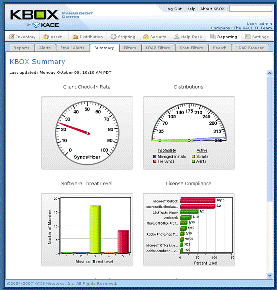
Kace announced today what it calls the first virtual systems management appliances to run natively within the VMware infrastructure. Kace’s Virtual Kbox appliances offer users a software product that runs on the user’s existing hardware. Earlier versions of the Kbox appliance required the installation of separate hardware to deploy and manage IT resources.

virtualization-kace-kbox.png

The Virtual Kbox appliances family is now shipping and fully supports physical and virtual machines across Windows, Mac, Linux and Solaris environments.

“Unlike a generation of virtual appliances preceding it, the Virtual Kbox family provides a systems management and deployment solution that is fully integrated from a highly optimized and hardened operating system through an easy-to-use, Web-based application,” Rob Meinhardt, cofounder and CEO of Kace, told TechNewsWorld.

virtualiztion-kace-kbox-21.gif

The virtual appliance aims at delivering the benefits of a hardware appliance, including fast deployment times with low costs and ease of use. It also provides the benefits of virtualization, such as improved resource utilization, reduced energy and cost savings, improved maintainability and support and the ability to quickly scale. While the product’s name implies that it is an actual hardware device, it is a software product that runs on the customer’s computer. The virtual appliance product will do all that a physical appliance will do, he said. It provides the full range of features found in physical appliance management devices.

Virtualization is exploding in popularity in many enterprise categories. Organizations are seeking new ways to leverage this technology, also according to Meinhardt. “We’ve seen an incredible ramping up for virtualization. This gave us an opportunity to deliver our Kbox products for virtual appliance management,” said Lubos Parobek, Senior Director of Product Management for Kace.

Kace, which started in 2003, is targeting companies with from 100 to 1 000 employees. It currently has 450 customers worldwide, mostly in the SMB category, according to CEO Rob Meinhardt.”That gives us up to 100 000 companies worldwide as potential users,” he said.

Technorati Tags: Kace, Kace+Kbox, Kace+Virtual+Kbox, Kbox, linux, Lubos+Parobek, Macintosh, Rob+Meinhardt, Solaris, Virtual+Kbox, virtualisation, virtualization, vmware, windows

Company Index: VMWare

[Source: TechNewsWorld]

Filed Under: News, Partnerships, People Tagged With: Kace, Kace Kbox, Kace Virtual Kbox, Kbox, linux, Lubos Parobek, Mac, Rob Meinhardt, Solaris, Virtual Kbox, virtualisation, virtualization, vmware, windows

Jonathan Schwartz Boasts About Sun xVM

January 30, 2008 by Robin Wauters Leave a Comment

Jonathan Schwartz, CEO of Sun Microsystems, wrote a blog post based on the recent Sun quarter financial announcements. From the post:

“Topping the list was the interest in Sun xVM. xVM is our free, open source virtualization platform, which we unveiled at Oracle Open World, alongside our management platform, xVM Ops Center. xVM will virtualize Windows, Linux or Solaris, on either Dell, HP, IBM or Sun hardware. We’ve seen broad interest from across the world, especially from customers that want to avoid putting a proprietary virtualization technology at the base of large scale open source datacenters (โ€œwhy go back?โ€ one said to me). Interest in our virtualization story (from xVM to Solaris containers) expands to every industry, and nearly every customer โ€“ it’s just about the number one item on the agenda.”

Not sure about you, but reading xVM out loud (ex-VM, get it?) always makes me smile ๐Ÿ™‚

Filed Under: News, Partnerships Tagged With: Jonathan Schwartz, linux, open source, Oracle Open World, Solaris, sun, sun microsystems, Sun xVM, virtualisation, virtualization, xVM Ops Center

Novell CTO Jeff Jaffe Outlines Technical Strategy for 2008

January 16, 2008 by Robin Wauters Leave a Comment

Jeff Jaffe , Executive Vice President and Chief Technical Officer for Novell, published a blog post 2 days ago outlining the company’s technical strategy for 2008. This is what he had to say about its focus on virtualization:

We see agility and customer focus as key in our progress on virtualization โ€“ one of the hottest areas in the industry. In SUSE Linux Enterprise 10, we introduced open source virtualization into a commercial Linux distribution before anyone else did. Once we introduced this, we spoke to customers. We spoke to partners. We spoke to analysts. We spoke to everyone! By listening, we discovered that we had not yet nailed it. In 2007 we listened, and in a very short time we became a leader in virtualization.

Our Open Enterprise Server customers told us that they wanted NetWare virtualized on SUSE Linux Enterprise Server โ€“ to take advantage of all of the drivers provided by Linux. And it needed to perform. After all, file and storage performance for NetWare is critical. A unique partnership between our Workgroup team and our Open Platform Solutions team has resulted in virtualization capability in SUSE Linux Enterprise Server 10 SP1 that is higher performance and more manageable than any other open source solution. This is the basis for OES 2.

We talked to other customers. They did not want virtualization as a bare technology. They wanted it to be managed. Novell quickly turned around and built technology to manage workloads and provision virtual machines. ZENworks Orchestrator. The best managed open source virtualization solution.

And we listened to customers and partners some more. They said get a tight partnership with Microsoft to optimize Windows on SUSE Linux Enterprise Server. Build a joint lab for testing โ€“ so customers have the confidence that our solution works best with Microsoft. We did all of that!

Here is the totality. From a barebones hypervisor in SUSE Linux Enterprise Server, we now have an industrial strength hypervisor, supporting the demanding NetWare workload, optimized for Microsoft, SAP and others, with a joint lab for testing. It is manageable with ZENworks and will address low latencies.

How did we do this? We listened!

Virtualization clearly is a key topic for the industry, and with the 2007 results we have both staked a claim and demonstrated our agile processes. Look for this to continue to be an area of significant investment in 2008.

Filed Under: News, People Tagged With: 2008, Jeff Jaffe, linux, Novell, OES 2, Open ENterprise Server, SUSE Linux Enterprise 10, virtualisation, virtualization, windows, ZENWorks Orchestrator

  • « Go to Previous Page
  • Go to page 1
  • Interim pages omitted …
  • Go to page 3
  • Go to page 4
  • Go to page 5
  • Go to page 6
  • Go to Next Page »

Primary Sidebar

Tags

acquisition application virtualization Cisco citrix Citrix Systems citrix xenserver cloud computing Dell desktop virtualization EMC financing Funding Hewlett Packard HP Hyper-V IBM industry moves intel interview kvm linux microsoft Microsoft Hyper-V Novell oracle Parallels red hat research server virtualization sun sun microsystems VDI video virtual desktop Virtual Iron virtualisation virtualization vmware VMware ESX VMWorld VMWorld 2008 VMWorld Europe 2008 Xen xenserver xensource

Recent Comments

  • C program on Red Hat Launches Virtual Storage Appliance For Amazon Web Services
  • Hamzaoui on $500 Million For XenSource, Where Did All The Money Go?
  • vijay kumar on NComputing Debuts X350
  • Samar on VMware / SpringSource Acquires GemStone Systems
  • Meo on Cisco, Citrix Join Forces To Deliver Rich Media-Enabled Virtual Desktops

Copyright © 2025 ยท Genesis Sample on Genesis Framework ยท WordPress ยท Log in

  • Newsletter
  • Advertise
  • Contact
  • About